Deadlines, milestones, and project updates often get lost in messy spreadsheets. That is where Office Timeline changes the game. Instead of presenting complex data in a confusing way, it transforms your project plans into clear, visually appealing timelines directly inside PowerPoint.
If you need to communicate project progress with impact and clarity, Office Timeline offers a smart and efficient solution.
See Office Timeline offers here
What is Office Timeline?
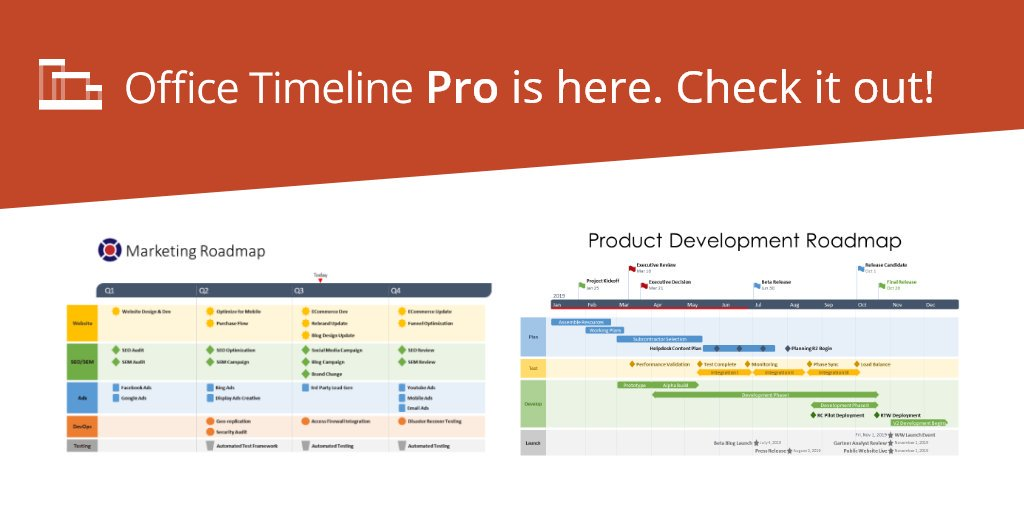
Office Timeline is a timeline creation tool designed to work seamlessly with Microsoft PowerPoint. It allows users to build professional timelines, Gantt charts, and roadmaps quickly and easily.
The platform is especially useful for project managers, consultants, and teams that need to present data in a clear and engaging format.
Because it integrates directly with PowerPoint, Office Timeline eliminates the need for complex design work while still delivering polished results.
Key Features of Office Timeline
Here is what makes Office Timeline stand out:
PowerPoint Integration
Create timelines directly within PowerPoint without switching tools.
Intuitive Drag-and-Drop Editor
Easily adjust tasks, milestones, and durations with a simple interface.
Professional Templates
Access a wide range of pre-designed templates for different use cases.
Data Import Capabilities
Import data from Excel, Microsoft Project, and other tools.
Customizable Designs
Tailor colors, shapes, and layouts to match your brand or presentation style.
See Office Timeline offers here
Pros and Cons
Let’s take a closer look at the advantages and limitations of Office Timeline.

Pros
- Flexible customization options
- Easy to use for beginners
- Seamless PowerPoint integration
- High-quality visual outputs
- Saves time on manual design

Cons
- Advanced features require premium plans
- Limited functionality outside PowerPoint
Performance and Reliability
When it comes to performance, Office Timeline delivers a smooth experience.
The tool runs efficiently within PowerPoint, allowing users to create and update timelines without lag. Even complex project plans are handled well, with quick rendering and responsive editing.
Additionally, updates and changes are applied instantly, making it easy to keep your presentations accurate and up to date.
Ease of Use
Is Office Timeline easy to use?
Yes, and that is one of its biggest strengths.
The interface is designed for simplicity. You can create a timeline in minutes using templates or by importing data. The drag-and-drop functionality makes adjustments quick and intuitive.
Even users with no design experience can produce professional-looking timelines with ease.
Office Timeline vs Traditional Methods
Here is how Office Timeline compares to manual timeline creation:
| Feature | Office Timeline | Manual Methods |
|---|---|---|
| Ease of Use | Very simple | Time-consuming |
| Visual Quality | Professional | Basic |
| Time Required | Minutes | Hours |
| Data Integration | Yes | Limited |
| Customization | Flexible | Restricted |
Clearly, Office Timeline offers a faster and more efficient way to create timelines.
Who Should Use Office Timeline?
Office Timeline is ideal for:
- Project managers presenting timelines
- Consultants creating client reports
- Teams sharing project updates
- Executives needing clear visual summaries
- Students working on presentations
If you frequently work with timelines or project planning, this tool can significantly improve your workflow.
See Office Timeline offers here
Pricing Overview
Office Timeline offers both free and paid versions.
The free version includes basic timeline creation features, while premium plans unlock advanced capabilities such as:
- More templates
- Enhanced customization
- Data import features
- Advanced timeline management tools
This flexibility allows users to start simple and upgrade as needed.
FAQ
Is Office Timeline beginner-friendly?
Yes. It offers an intuitive interface and ready-to-use templates.
Can I import data into Office Timeline?
Yes. You can import data from Excel, Microsoft Project, and other sources.
Does Office Timeline work outside PowerPoint?
It is primarily designed for PowerPoint, although there is also an online version available.
Is Office Timeline worth it?
Yes. It saves time and improves the quality of your presentations.
Final Thoughts
Office Timeline is a powerful yet simple tool that transforms the way you present project data. By combining ease of use with professional design, it helps you communicate timelines clearly and effectively.
If you want to create impactful presentations without spending hours on design, Office Timeline is an excellent choice.
See Office Timeline offers here